Every new school gets a 14-day free trial with full access to all features, so you can set up your school and try everything before you choose a plan.
When the trial starts
The trial starts when your school has been approved and you finish setting it up on the ETL Dashboard. You get an email saying your free trial has started. See Register your school and Setup checklist.
See how many days are left
- At the top of every page, the trial box shows days left in trial, with an Upgrade Now button.
- On the Dashboard, the banner says You are in Trial Period! and when it ends, with a View Plans button.
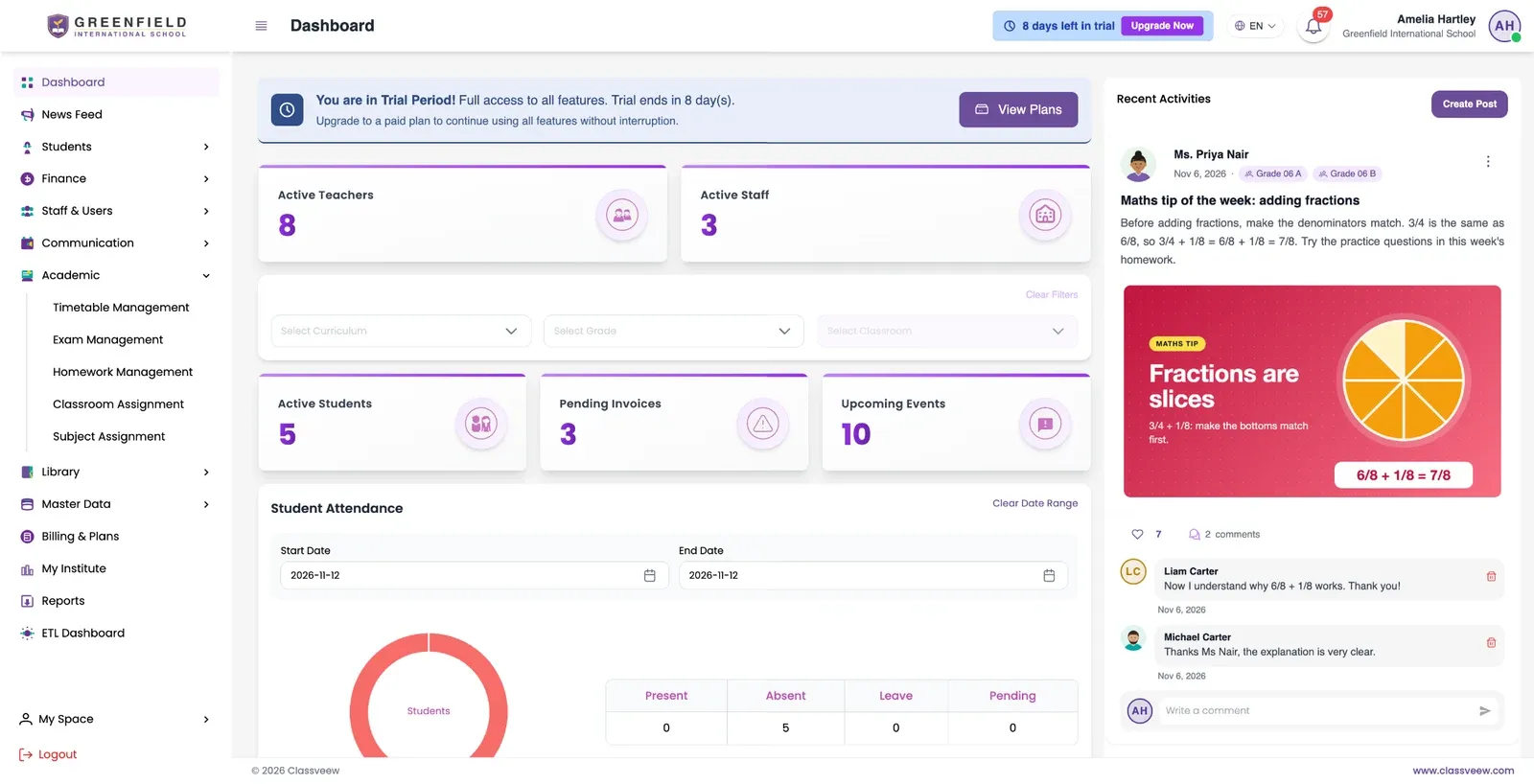
We also email the school admin 3 days and 1 day before the trial ends.
Choose a plan before it ends
- Select Upgrade Now or View Plans, or open Billing & Plans in the menu.
- Choose Monthly or Annually and a plan, then follow the steps. See Upgrade or renew your plan.
For plan prices, see Pricing.
When the trial ends
If you haven’t chosen a plan, you see Free Trial Ended and most features are locked until you subscribe. Your data is kept safe and is available again as soon as you choose a plan.
Teachers and other staff see Subscription Inactive and are asked to contact their school administrator. Only people who manage billing can choose a plan.
Good to know: the trial gives you every feature. If you then choose a smaller plan, some features may not be included. See Plans and per-student billing.