In short: good attendance management means a register that takes under a minute, a clear cut-off time after which unmarked students count as absent, an alert to parents the same morning, leave recorded properly, holidays skipped, and a monthly look at each student’s attendance percentage so you act before small absences become big gaps.
Attendance is the one job every school does every day. It’s also one of the most important: a student who isn’t in school can’t learn, and a parent who doesn’t know their child is missing can’t help. In many countries, schools are legally required to keep an accurate register.
This guide covers how to take attendance, the tools available, the policy every school should write down, the reports to watch and how to reduce absence. Each part ends with how Classveew handles it.
Why attendance matters more than it looks
- Safety. If a child left home but didn’t arrive, someone needs to know within hours, not days.
- Learning. Missing one day in ten adds up to almost a month of school a year.
- Early warning. A pattern of absences is often the first sign of a problem at home, with health or with bullying.
- Records. Attendance history is needed for reports, transfers, scholarships and, in some places, the authorities.
- Fees and planning. Knowing who is really attending helps with class sizes and staffing.
Ways to take attendance
| Method | How it works | Pros | Cons |
|---|---|---|---|
| Paper register | The teacher ticks names in a book | Cheap, familiar | Slow to add up; parents not told; easy to lose |
| Spreadsheet | Typed in after the paper register | Totals are easier | Double work; often done days later |
| Phone or tablet app | The teacher marks the class in the app | Fast, immediate, parents alerted | Teachers need a phone and internet |
| Cards or QR codes | Students scan at the gate | Fast at the gate | Hardware cost; cards lost or shared; still needs class checks |
| Biometric | Fingerprint or face at the gate | Hard to fake | Expensive; privacy concerns with children’s data |
For most schools, a phone register marked by the class teacher gives the best balance: no hardware, a record in seconds, and parents told the same morning. It’s what Classveew uses.
Write an attendance policy
Before you choose a tool, write down your rules. A one-page policy should answer:
- When is the register taken? For example, at the start of the first period.
- What is the cut-off time? After this, an unmarked student counts as absent.
- What counts as late? Arriving after the start time but before the cut-off, or after the cut-off?
- How do parents report an absence in advance? And by when?
- What are the leave types? For example medical, personal, vacation and other.
- Who follows up an unexplained absence? And how quickly?
- What happens after repeated absences? A call, a meeting, a letter?
- Which days are not school days? Public holidays, school holidays and term breaks.
Share it with parents at admission and with teachers at the start of each year.
The daily routine
A simple routine that works:
- Before the start time: students arrive. If your school checks students in at the gate, they’re marked as they arrive.
- At the start of the day: the class teacher marks the register, including anyone who’s late.
- Shortly before the cut-off: anyone still unmarked gets a reminder to the teacher.
- At the cut-off: students still not marked are recorded as absent, and their parents are told.
- During the day: late arrivals and early leavers are recorded with the time.
- End of the day: students are checked out, if your school tracks it.
- Next morning: the office follows up any absence parents haven’t explained.
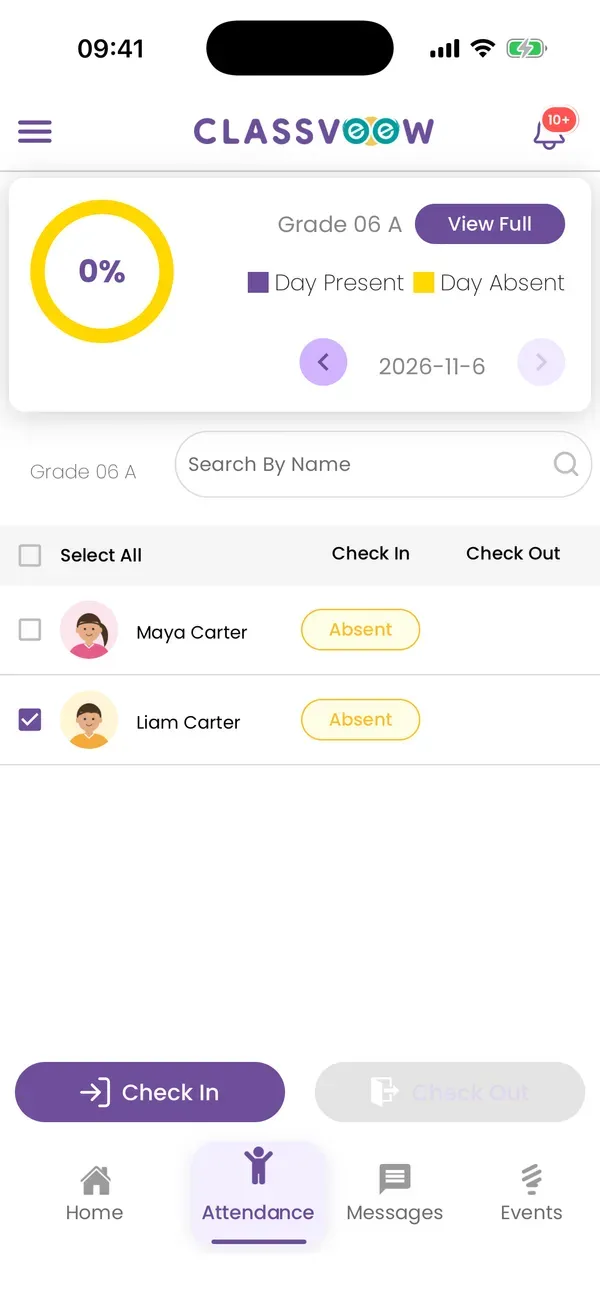
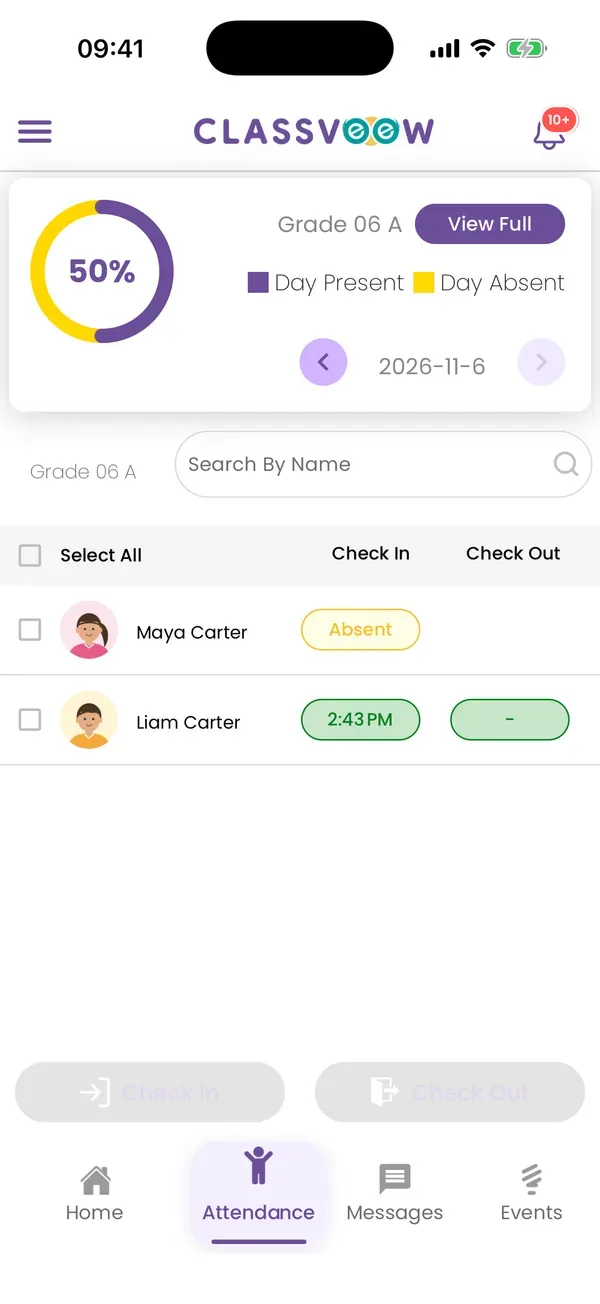
In Classveew: the teacher opens Attendance in the app, ticks the students who have arrived (or Select All) and taps Check In. Parents get a notification straight away, such as “[Student] from Grade 06 A has been checked in today at 7:43 AM”. If a student is late, the teacher ticks Late Check-In so their parents are told. Twenty minutes before your cut-off time, the class teacher gets a reminder if anyone is still unmarked. At the cut-off, unmarked students are marked absent automatically, and their parents are notified. At the end of the day, teachers can tap Check Out in the same way.
Set the school’s hours and cut-off
The cut-off is the heart of automatic attendance. Set it too early, and students on a late bus are marked absent. Too late, and parents of truly missing children hear about it too late.
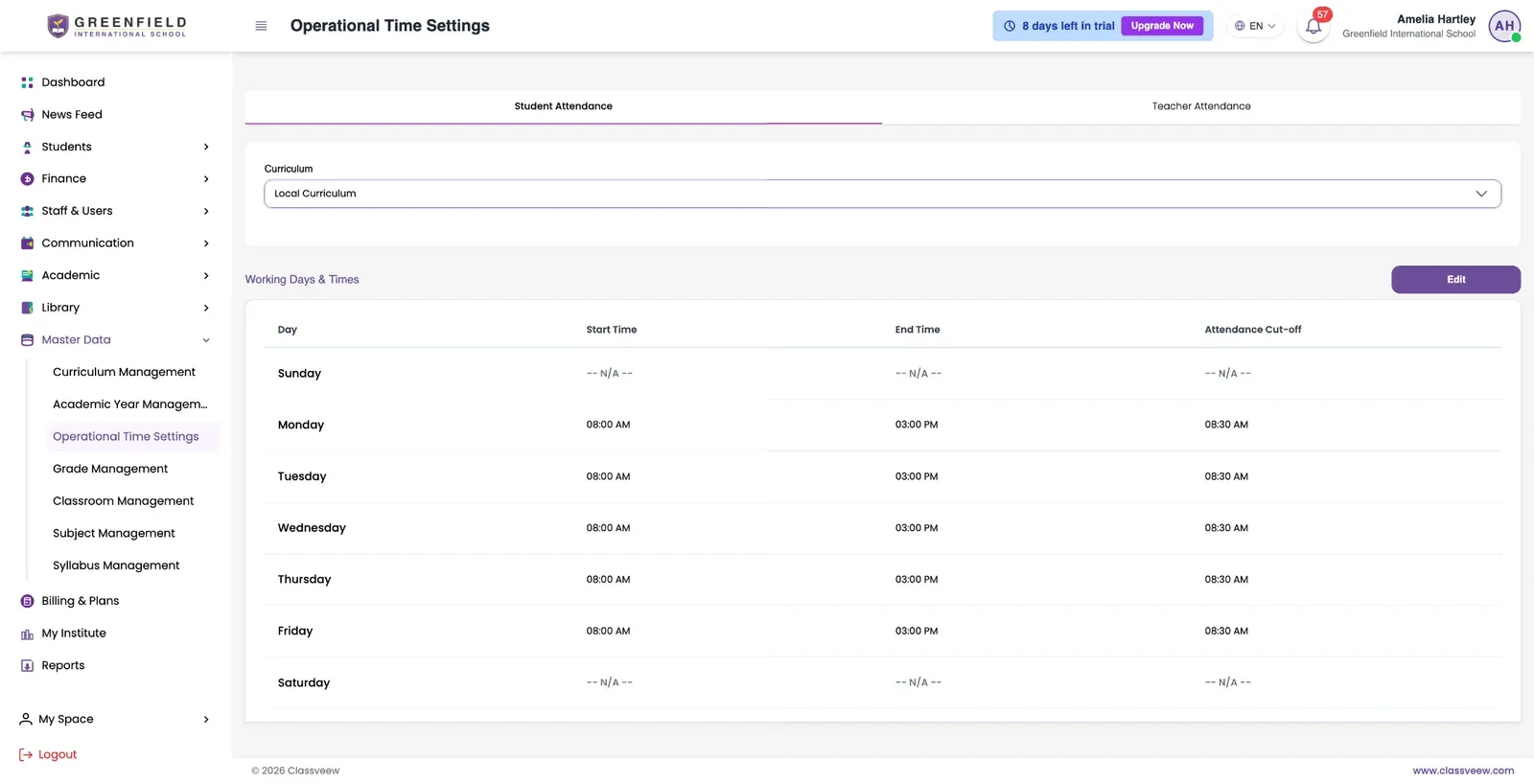
In Classveew: in Operational Time Settings, you choose the school days, and for each one the Start Time, End Time and Attendance Cut-off. Each curriculum can have its own hours, so a school running two programmes with different days can keep both. The register follows these days, so nobody is marked absent on a closed day.
Holidays and term breaks
Nothing damages trust in attendance data faster than students marked absent on a public holiday.
In Classveew: add holidays under Academic Year Management → Holidays, as a Public Holiday, Mercantile Holiday or School Specific holiday. Breaks between terms are added automatically as Term Break. On those days, the register isn’t created and nobody is marked absent. If your school does hold classes on a holiday, a teacher can still create the register by hand.
Leave: absences parents tell you about
An absence parents tell you about in advance is very different from one nobody can explain. Your system should keep them apart.
In Classveew: parents send a leave request in the app: the dates, the type (Medical, Personal, Vacation or Other) and a reason. It’s recorded straight away, with no approval step, and the student shows as On Leave in the register. Parents can change or cancel upcoming leave. If a student on leave turns up after all, the teacher checks them in as usual. Staff can also record leave for a student after a phone call.
The reports to watch
Look at these regularly:
| Report | How often | What to look for |
|---|---|---|
| Today’s register | Every morning | Classes not yet marked; unexplained absences |
| Attendance by class | Weekly | A class with unusually low attendance |
| Each student’s attendance % | Monthly | Students below your threshold, e.g. 90% |
| Late arrivals | Monthly | The same students late again and again |
| Absences by day of week | Each term | Patterns, such as many absences on Mondays or Fridays |
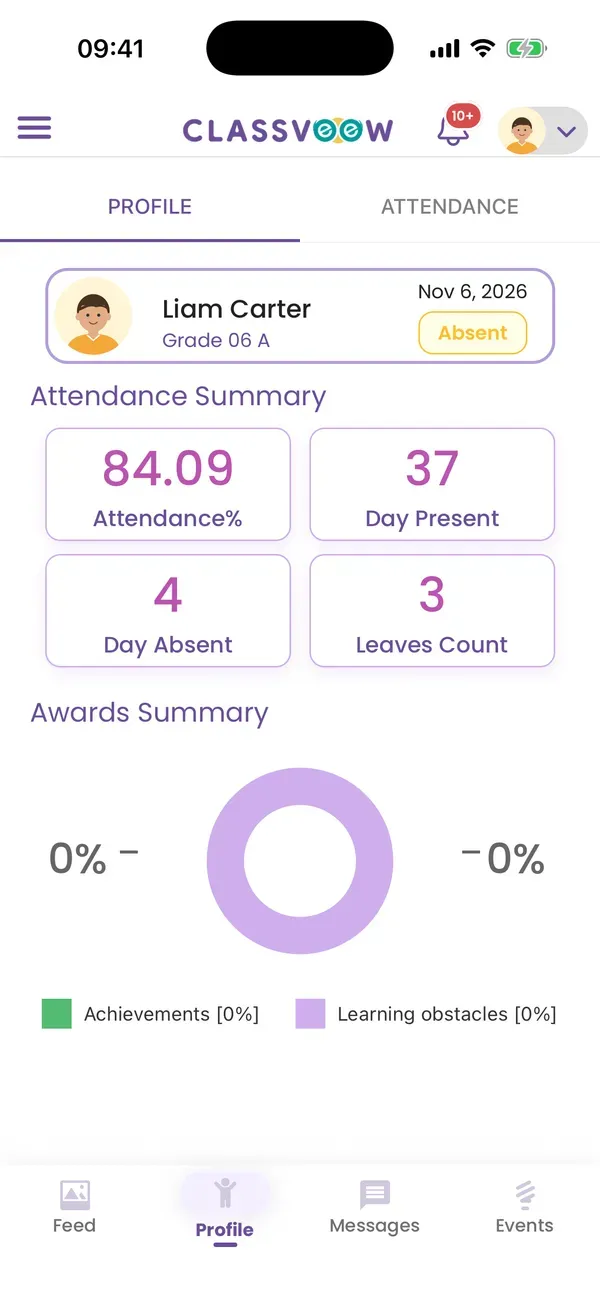
In Classveew: Attendance Tracking on the web portal shows any classroom’s register for any date, with counts of pending, absent, checked in, checked out and on leave. The admin dashboard shows an attendance chart you can filter by curriculum, grade or classroom. The Student Attendance Report exports a CSV with one row per student per day: the status (Present, Absent, Leave or Pending), check-in and check-out times, late arrivals, early leaves and leave reasons, for up to a year. Parents see their own child’s attendance percentage, days present and absent and leave taken in the app.
How to reduce absence
- Tell parents the same morning. An absence alert at 9 a.m. gets a reply; a letter a week later doesn’t.
- Make reporting leave easy. If parents can tell you from their phone, they will.
- Follow up every unexplained absence, the same day if you can.
- Watch the percentage, not only the days. Two days a month sounds small; it’s 10% of school.
- Talk early. Meet the family when a pattern starts, not when it’s a crisis.
- Recognise good attendance. Praise for classes and students who improve.
- Look for the reason. Transport, health, bullying or work at home each need a different response.
- Keep the data clean. If holidays are counted as absences, nobody will trust the numbers.
Staff attendance
Teachers’ attendance matters too: for payroll, cover and safety.
In Classveew: teachers check in and out on the app’s home screen. A school can require staff to be at school to check in, with an allowed distance in metres from the school’s location. Teachers can ask for a correction for the last seven days, which an admin approves or declines, and an admin can’t approve their own request. Staff leave covers leave types with yearly allowances, half days and approval.
Choosing an attendance system: a short checklist
- Can a teacher mark a full class in under a minute?
- Are parents told automatically about check-in, late arrival and absence?
- Is there an automatic absence at a cut-off time?
- Are holidays and term breaks skipped?
- Can parents send leave requests?
- Can you export attendance for a date range?
- Does it handle staff attendance too?
For the full list of features to look for, see the school management system features checklist, or read more on Attendance in Classveew.