How to use this checklist: go through it before your first demo and mark each line Must have, Nice to have or Not needed for your school. In the demo, ask the supplier to show each must-have, not describe it. Each section ends with how Classveew handles it, so you can see a real example.
A school management system is only as good as the features your school actually uses every day. Long feature lists on websites all look alike. The difference shows in the details: whether attendance alerts reach parents by themselves, whether a parent can pay part of a fee, whether report cards come out without anyone retyping marks.
This checklist goes module by module, from the student record to security. For each one you get what it should do, the question that separates a good system from a weak one, and what Classveew does.
1. Student records
The student record is the centre of everything. Attendance, fees, exams and messages all hang off it.
What to look for
- One profile per student with personal details, admission number, guardians, medical notes (allergies, medication, blood group) and an emergency contact.
- A clear status for every student, such as active, inactive, graduated or left.
- A history of the student’s classes over the years.
- Parents linked to more than one child, including brothers and sisters in different classes.
- Bulk import from Excel, with a clear report of the rows that failed and why.
Ask in the demo: Show me a student who moved class this year. Where do I see that history?
In Classveew: each student has a profile with guardian, medical and emergency details, and one of four statuses: Active, Inactive, Graduated or Drop Off. The Student Journey shows every class move with dates. You can upload up to 500 students per Excel file, with their parents in the same file, and download an error report for any rows that failed. See Bulk upload students.
2. Attendance
Attendance is the feature teachers use most, every single morning. It has to be fast.
What to look for
- Teachers mark the register on their phone in under a minute, with “select all” for full classes.
- Late arrival and early leave recorded, not only present or absent.
- Automatic absence: students still unmarked at a cut-off time are marked absent.
- An alert to parents when their child is checked in, late or absent.
- Holidays and weekends skipped, so nobody is marked absent on a day the school is closed.
- Leave requests from parents.
- Attendance reports you can export.
Ask in the demo: What happens if a teacher forgets to take the register?
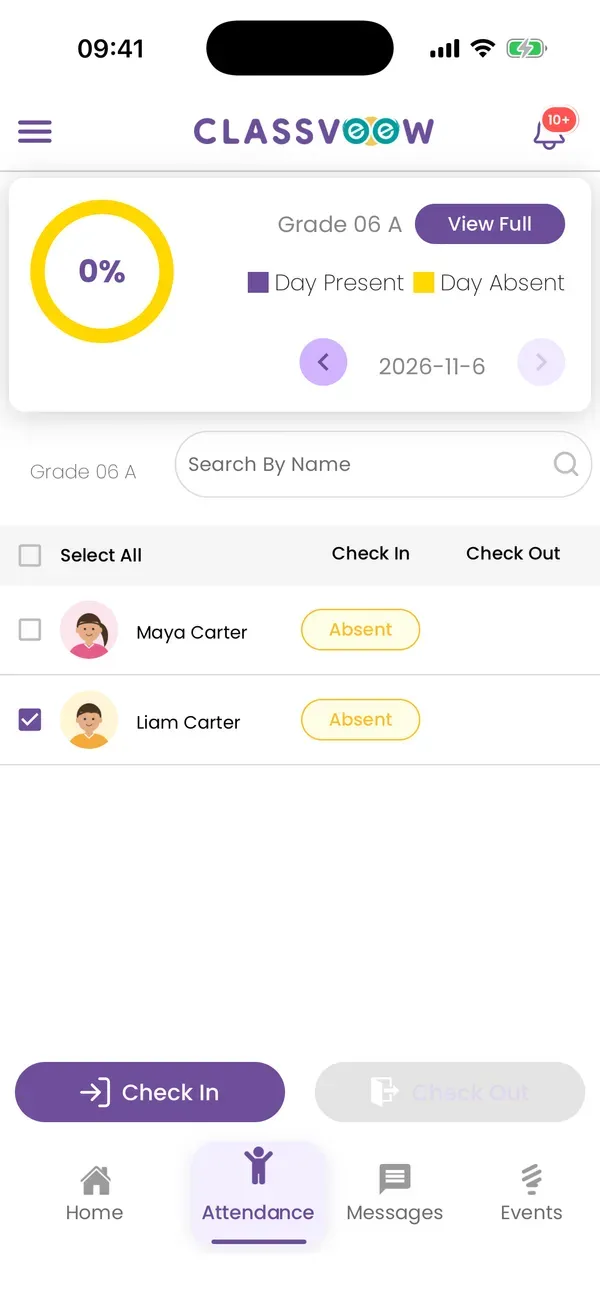
In Classveew: teachers check students in and out in the app. You set a cut-off time for each school day; students still unmarked at that time are marked absent and their parents are told, and the class teacher gets a reminder 20 minutes before. Parents send leave requests in the app. Public, mercantile and school holidays and term breaks are skipped. Staff attendance works the same way, with an optional location check. Read more in Student attendance management.
3. Fees and billing
Fees are where a school management system pays for itself, or doesn’t.
What to look for
- Fee templates with several items, tax, discounts and surcharges.
- Invoices for a whole class in one step, and repeating invoices (monthly, termly, yearly).
- Part payments with the balance worked out automatically.
- Late fees with a grace period.
- Automatic reminders to parents before and after the due date.
- Online card payment for parents, and counter payments recorded by the office.
- Receipts, refunds and a way to undo a payment entered by mistake.
- A daily cash count for the cashier.
- Finance reports.
Ask in the demo: A parent pays half the term fee today and the rest next month. Show me both payments and the receipt.
In Classveew: fee templates with items, adjustments (percentage or fixed) and tax; invoices once, weekly, monthly or yearly; part payments; late penalties after a grace period; an email with the invoice PDF when it is issued, an app reminder 7 days before the due date and a daily reminder while overdue; card payment in the parent app with 3-D Secure; cashier sessions with an opening balance and a cash count at the end. See School fee management.
4. Exams and report cards
What to look for
- Exams scheduled per class, with several subjects, dates and a marking teacher for each.
- Paper exams, and online exams if you need them.
- Marks entered once, by the teacher, on the web or on a phone.
- Totals, averages and letter grades worked out by the system.
- Report cards generated as PDFs, with the teacher’s remarks.
- Results released to parents only when the school is ready.
Ask in the demo: Show me the path from a teacher entering marks to the parent opening the report card.
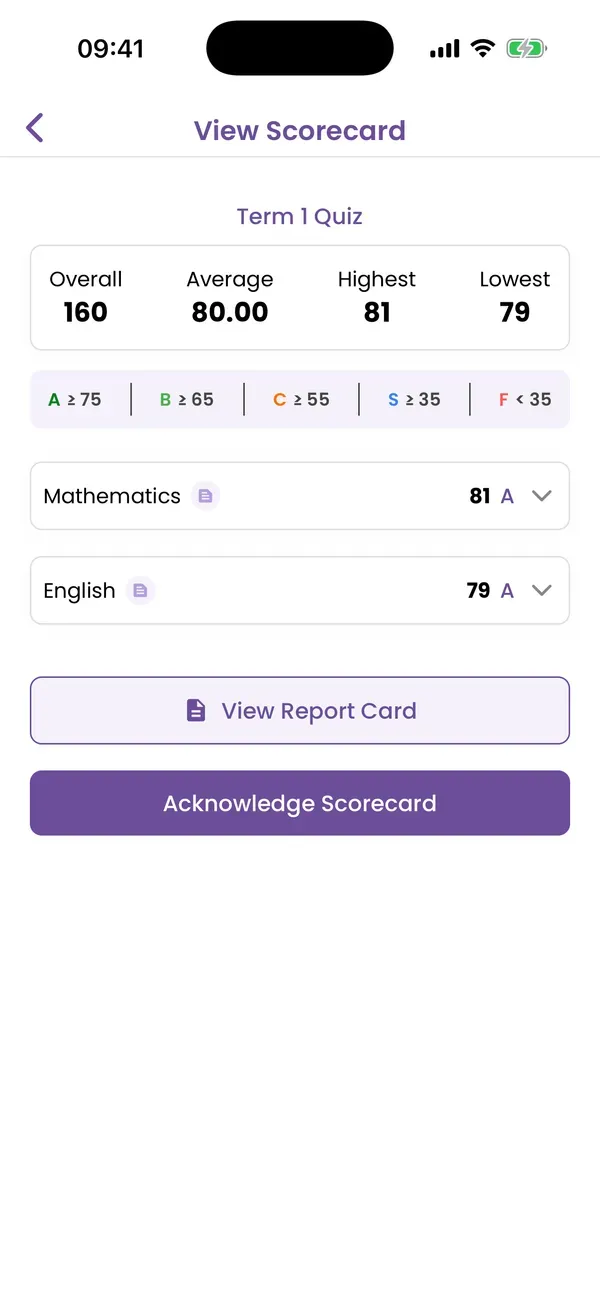
In Classveew: exams are offline (on paper) or online in the student portal. Online papers can have multiple choice, short and long answers, math and drawing questions; multiple choice is marked automatically. Marking teachers enter scores out of 100 with remarks, on the web or in the teacher app. When the school releases scores, parents get a notification and open the report card PDF in the app, and the school sees who has acknowledged it. Grades follow A from 75, B from 65, C from 55, S from 35 and F below 35. See Report card comments.
5. Timetables
What to look for
- A weekly timetable per class, built from lessons that repeat.
- Warnings when lessons clash.
- Changes to one lesson without rebuilding the week.
- Teachers and parents see the timetable on their phones.
- Online lessons with a meeting link.
- A printable version.
Ask in the demo: Move one Tuesday lesson for next week only. Does the rest of the term stay the same?
In Classveew: each lesson repeats daily, weekly or monthly between two dates, inside your school hours. Adding a lesson that overlaps another in the same classroom shows the dates that clash. You can edit one session or the whole series. Teachers are notified when they’re added to or removed from a lesson. See How to make a school timetable.
6. Homework
What to look for
- Homework set for one or several classes, with due dates and attachments.
- Students or parents hand in work as photos or files.
- Late hand-ins marked as late.
- Scores or written feedback, released to parents.
In Classveew: three homework types: Grade and Respond (a score out of 100 per task), Two Way (feedback only) and One Way (for reference, nothing handed in). Parents hand in from the app with Take Photo, and students hand in on the web. Files up to 100 MB per task. See Homework.
7. Parent communication
What to look for
- Private messages between teachers and parents, without sharing phone numbers.
- Class groups.
- A news feed for photos and announcements.
- Events with consent (permission slips) and reminders to those who haven’t replied.
- Notifications for every important moment, kept in a list so nothing is lost.
Ask in the demo: Show me how a teacher messages one parent, then the whole class.
In Classveew: teachers message one parent, several parents (each gets a private thread) or the class group. Group chats show names and photos, not phone numbers. The news feed takes photos, a PDF or a video, for the whole school or chosen classrooms. Events can be announcements, surveys, meetings or paid events, with a consent deadline and reminders. See WhatsApp groups and Excel vs a school system.
8. The parent app
What to look for
- A real app on iPhone and Android.
- One account for all of a family’s children, even at different schools.
- Attendance, homework, results, fees, timetable, events and messages in one place.
- Notifications in the parent’s language.
In Classveew: one app for parents and teachers on iPhone and Android, in English and Arabic. Parents switch between their children at the top right, and between schools if their children attend different schools that use Classveew. See Parent app.
9. End of year: re-enrollment
What to look for: moving students to next year’s classes in bulk (promote, repeat a year, transfer, graduate, leave), with parents asked whether their child is returning.
In Classveew: a re-enrollment cycle for each curriculum and academic year. You decide each student’s outcome, apply it now or schedule it for the end of the year, and finalize the cycle once the year has ended. Parents answer “Will your child be returning?” in the app. See Student re-enrollment process.
10. Library, awards and the rest
Smaller modules that many schools use:
- Library: books, lending and returns, and each student’s borrowing history.
- Awards: praise badges and “obstacle” flags from teachers, visible to parents.
- Syllabus: what each class will cover, shared with parents.
- Staff leave: leave types with yearly allowances, half days and approval.
Classveew has all four. Some systems also offer transport, hostel or payroll. If you need those, ask each supplier directly: Classveew’s feature list today doesn’t include them.
11. Reports and the dashboard
What to look for
- A dashboard with today’s numbers: students, staff, attendance, unpaid invoices, upcoming events.
- Exports to Excel or CSV: students, staff, attendance and finance.
- Filters by class, grade, date and status.
In Classveew: the admin dashboard shows active teachers, staff and students, pending invoices, upcoming events and an attendance chart. The Reports Dashboard exports student, teacher, attendance and finance reports as CSV, for up to a year at a time. See Reports.
12. Roles, permissions and security
This is the section schools skip, and the one that matters most if something goes wrong.
What to look for
- Roles with permissions, so a fees clerk sees fees but not exam marks.
- Custom roles your school can create.
- Strong passwords, account lockout after repeated wrong attempts and two-step verification.
- Encryption, and a clear answer on where data is stored.
- Uploaded files kept private.
- Safe online payments, where the system never sees full card numbers.
In Classveew: every screen is tied to a permission, and schools create their own roles. Two-step verification sends a 6-digit code by email, and schools can make it compulsory on the web portal. Data is stored on AWS in the Asia Pacific (Malaysia) region, encrypted at rest and in transit. Files are private and shared through links that expire after an hour. Fees are paid on a bank-hosted page with 3-D Secure. See Security.
13. Setup, languages and support
What to look for
- Templates for your curriculum, so you don’t build grades, terms and subjects from scratch.
- Excel import for students, parents, staff and other setup data.
- The languages your staff and parents need.
- A free trial on your own data.
- Named people to help you start.
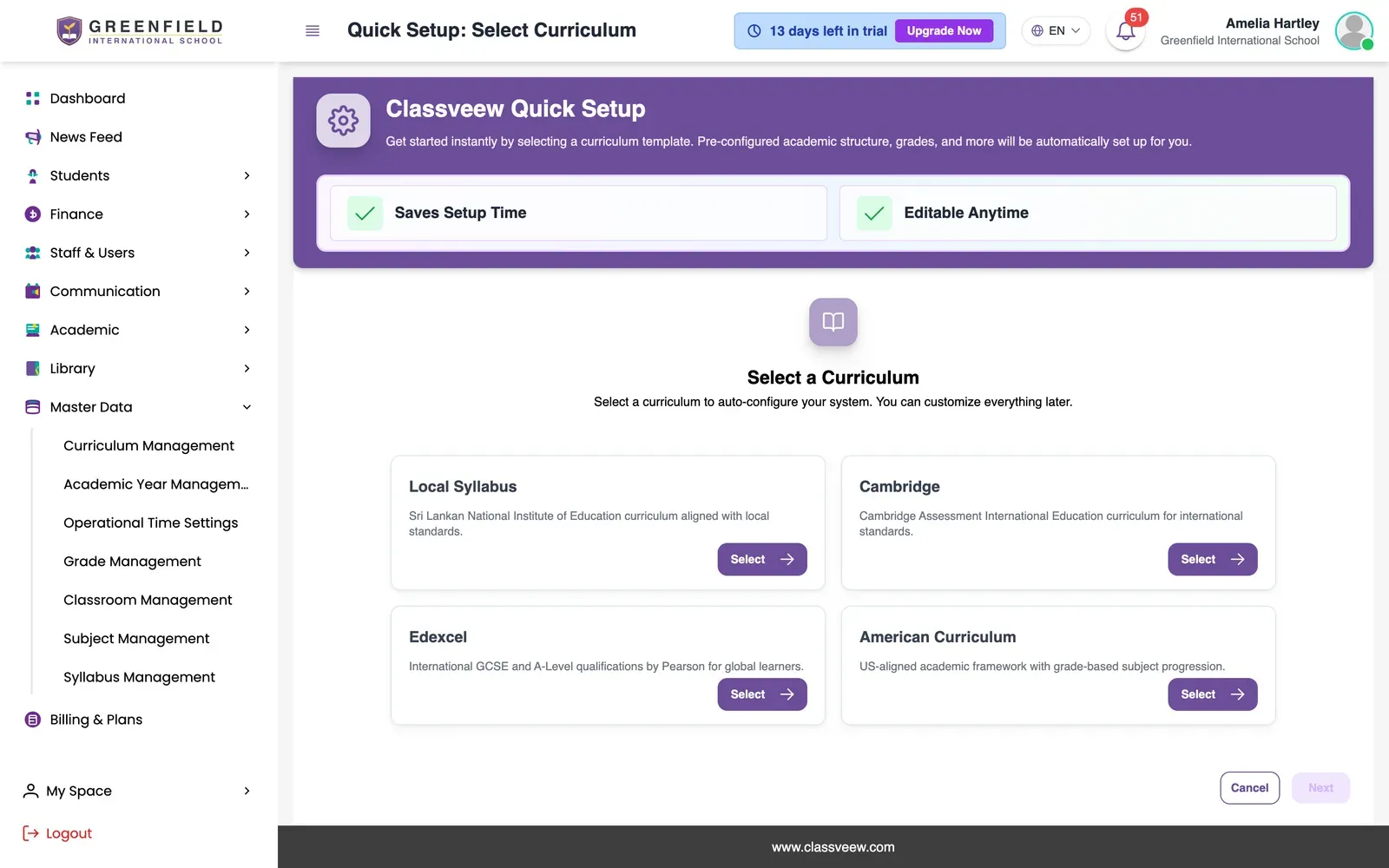
In Classveew: Quick Setup has four templates: Local Syllabus, Cambridge, Edexcel and American Curriculum. Every setup card on the ETL Dashboard has an Excel template. The web portal and apps are in English and Arabic. Every school gets a 14-day free trial with all features, and our team supports onboarding.
The checklist to copy
Copy this table into a spreadsheet, add a column for each supplier and score each line from 0 (missing) to 2 (works well in the demo).
| Area | Feature | Must have / Nice to have |
|---|---|---|
| Students | Profiles with guardians, medical and emergency details | |
| Students | Statuses and class history | |
| Students | Excel import with an error report | |
| Attendance | Phone register for teachers | |
| Attendance | Automatic absence at a cut-off time | |
| Attendance | Parent alerts for check-in, late and absent | |
| Attendance | Parent leave requests | |
| Fees | Fee templates with discounts and tax | |
| Fees | Repeating invoices for whole classes | |
| Fees | Part payments and balances | |
| Fees | Late fees with a grace period | |
| Fees | Automatic reminders | |
| Fees | Card payment in the parent app | |
| Fees | Cashier sessions and cash count | |
| Exams | Paper and online exams | |
| Exams | Automatic totals and grades | |
| Exams | Report card PDFs for parents | |
| Timetable | Repeating lessons and clash warnings | |
| Homework | Hand-in from the app, scores or feedback | |
| Communication | Private teacher–parent messages | |
| Communication | Class groups without phone numbers | |
| Communication | News feed and events with consent | |
| Parent app | iPhone and Android, several children | |
| End of year | Bulk promotion and re-enrollment | |
| Reports | Dashboard and CSV exports | |
| Security | Roles, two-step verification, encryption | |
| Setup | Curriculum templates and a free trial |
The supplier with the highest score on your must-haves is your shortlist. Then compare price, using the table in School management system price in Sri Lanka.